
Trade any token on Solana in seconds with Orca’s intuitive swap interface.Documentation Index
Fetch the complete documentation index at: https://docs.orca.so/llms.txt
Use this file to discover all available pages before exploring further.
Orca compares quotes from its own pools and Jupiter aggregator, so you always get the best price without leaving the app.
Before You Start
Solana Wallet
Phantom, Backpack, or any supported wallet
SOL for Fees
Keep at least 0.05 SOL for network fees
Tokens to Trade
The token you want to swap
How to Swap
Go to Orca and connect your wallet
Visit orca.so and click Connect Wallet in the top right corner (or center of the trading modal on mobile).Select your wallet from the list and approve the connection.
Select your tokens
In the swap interface: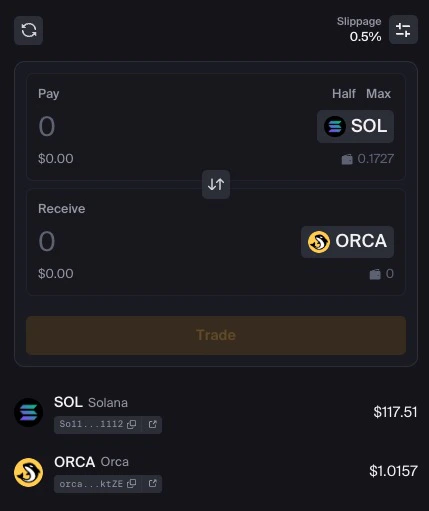
- Click the top token selector to choose the token you want to sell (pay with)
- Click the bottom token selector to choose the token you want to buy (receive)
Enter the amount
Type the amount you want to swap in either field: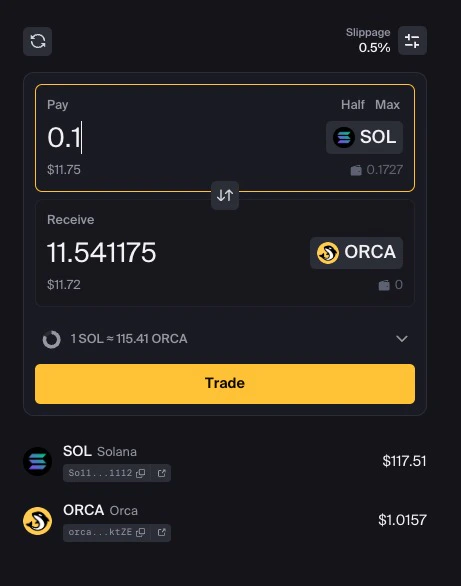
- Enter in the top field to specify how much you’re selling
- Enter in the bottom field to specify how much you want to receive
Review the quote
Check the swap details: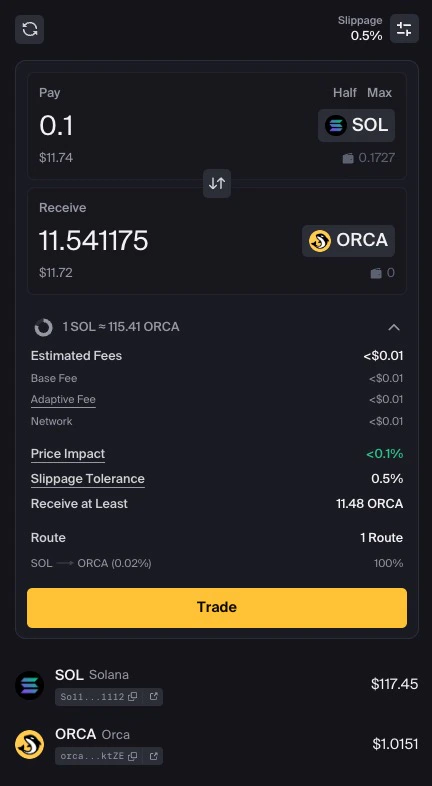
- Rate — Current exchange rate
- Price impact — How your trade affects the price
- Minimum received — Guaranteed minimum after slippage
Compare prices (optional)
Orca shows you quotes from both:
- Orca Direct — Trading through Orca’s pools
- Jupiter — Aggregated from multiple DEXs
Adjust slippage (optional)
Click the gear icon (⚙️) to adjust slippage tolerance if needed.
See Understanding Slippage for more details.
| Pair Type | Recommended Slippage |
|---|---|
| Stablecoins | 0.1% |
| Major pairs (SOL/USDC) | 0.5% |
| Volatile tokens | 1-3% |
After Your Swap
Where are my tokens?
Where are my tokens?
Swapped tokens appear in your wallet immediately after the transaction confirms. Check your wallet’s token list—you may need to add the token if it’s new to your wallet.
Why did I receive less than quoted?
Why did I receive less than quoted?
The final amount can differ slightly due to:
- Slippage — Price moved between quote and execution
- Price impact — Your trade size affected the price
My transaction failed—what now?
My transaction failed—what now?
Common causes and fixes:
- Slippage too low — Increase slippage tolerance
- Insufficient SOL — Add more SOL for fees
- Price moved — Try again with updated quote
Tips for Better Trades
Check Price Impact
High price impact means you’re moving the market. Consider splitting large trades or using a pool with more liquidity.
Verify Token Addresses
Always verify token mint addresses, especially for new or unfamiliar tokens. Scam tokens often mimic popular names.
Start Small
Testing with a small amount first is always a good practice, especially with new tokens or large trades.
Compare Quotes
Use Orca’s built-in comparison to ensure you’re getting the best deal between Orca and Jupiter.
Get SOL for Fees
If you need SOL for transaction fees:- From a centralized exchange — Buy SOL and withdraw to your wallet address
- Through a fiat on-ramp — Some wallets have built-in purchase options
- Bridge from another chain — Use a bridge if you have assets elsewhere
When withdrawing from an exchange, ensure you select the Solana (SPL) network. Test with a small amount first.
Next Steps
Understanding Slippage
Learn how slippage works and how to protect your trades
Range Orders
Set limit-order-style trades that earn fees while waiting
Provide Liquidity
Earn trading fees by providing liquidity
FAQs
Common questions and troubleshooting