
Plan smarter. Provide liquidity with confidence. The Position Simulator helps you visualize how a planned liquidity position could perform as the current price moves through your intended range. Before you commit capital, explore projected PnL, token mix, impermanent loss, and estimated yield—all in real time.Documentation Index
Fetch the complete documentation index at: https://docs.orca.so/llms.txt
Use this file to discover all available pages before exploring further.
The Position Simulator is an informational tool designed to help you manage risk. It does not constitute financial advice. Past performance is not a guarantee of future returns.
Why Use the Position Simulator?
With concentrated liquidity, your earnings depend heavily on price staying within your chosen range. The Position Simulator helps you:- Understand potential outcomes — See how your position value changes across different prices
- Evaluate impermanent loss — Visualize the trade-off between fees earned and IL
- Compare LP vs HODL — Determine if providing liquidity outperforms simply holding
- Optimize your range — Test different ranges before committing
Getting Started
Set your position parameters
In the Create Position sidebar, set your desired price range and optionally enter a deposit amount.
Open the Position Simulator
Find the Position Simulator directly below the Liquidity Terminal chart. Click to expand it.
Set your selected price
Click or drag the chart marker to set a Selected price—this is the price at which you want to evaluate your position.
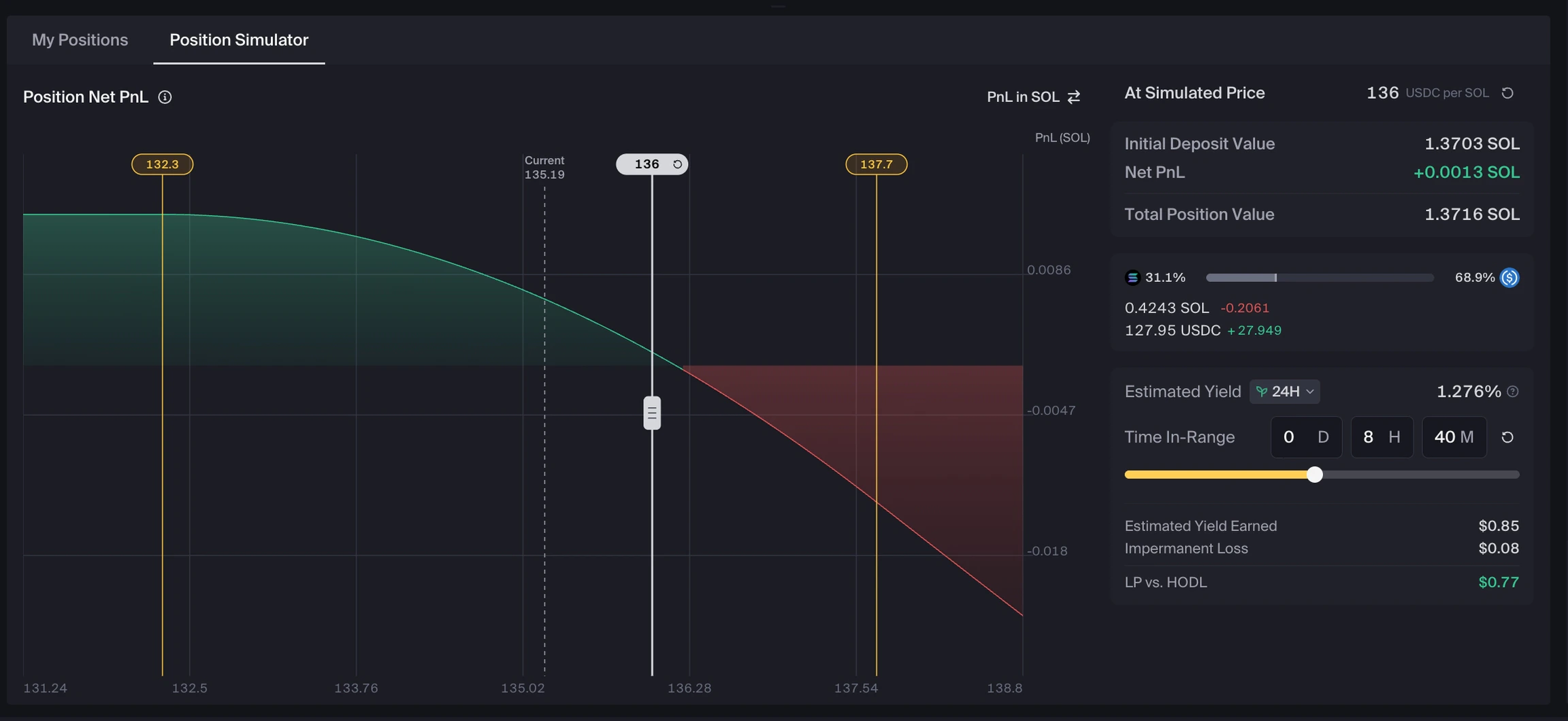
Understanding the PnL Chart
The chart is the heart of the Position Simulator. It shows how your projected outcome changes with price.| Element | Description |
|---|---|
| X-axis | Simulated pool price |
| Y-axis | Net PnL (in your selected denomination) |
| White slider | Your selected pool price for simulation |
| Gray dashed line | Current market price (reference point) |
| Green area | Positive PnL zone |
| Red area | Negative PnL zone |
Selected Price vs Current Price
Current Price
The live market price. This serves as a reference point and is shown as a gray dashed line on the chart.
Selected Price
A price you choose to evaluate. The simulation updates in real-time as you adjust this value.
Denomination Toggles
The denomination toggles change how values are displayed:- Price denomination affects the x-axis (changing this may flip the curve)
- PnL denomination affects the y-axis (may invert values)
If the chart flips after toggling tokens, this is expected behavior. The price denomination and PnL denomination can invert the curve.
Key Metrics Explained
Net PnL
Net PnL
Your projected profit or loss at the selected price, relative to your deposit. This includes:
- Token mix changes
- Projected fees and rewards
- Shown in your selected currency denomination
Token Mix
Token Mix
Shows how your liquidity position is split between the two pool tokens at the selected price.In concentrated liquidity pools, your position automatically shifts between tokens as price moves:
- As price increases, your position holds more of one token
- As price decreases, your position holds more of the other token
- When price moves outside your range, the position becomes 100% one-sided
Estimated Yield
Estimated Yield
Projected fee return rate based on historical data and projected yields for the selected timeframe (e.g., 1h, 24h, 7d). Shown as a percentage of deposit value.Note: This is not annualized in the simulator.
Estimated Yield Earned
Estimated Yield Earned
Projected fees earned over your chosen Time In-Range.
- Only populates when a Time In-Range is entered
- Displayed in $ when you’ve entered deposit amounts
Time In-Range
Time In-Range
How long you expect the position to stay within its range (earning fees).Important: Time In-Range represents the total time your position remains in range, not total elapsed time.
LP Opportunity Cost
LP Opportunity Cost
The total cost an LP may incur compared to simply holding the deposited assets. It combines two sources of potential loss:
- Impermanent Loss — Occurs as price moves away from the deposit price while the position remains in range
- Directional Price Exposure — Occurs when a position moves out of range and becomes fully one-sided
Impermanent Loss (IL)
Impermanent Loss (IL)
The opportunity cost of providing liquidity versus holding your tokens at the selected price. IL depends only on price movement, not time.
- Always zero when the selected price matches the entry price
- Always shown as a loss when price moves away from entry price
LP vs HODL
LP vs HODL
The difference between LPing or simply holding your tokens.Formula:
Estimated Yield Earned − LP Opportunity Cost- Positive: LPing outperforms holding
- Negative: Holding outperforms LPing
- Shows as a percentage without deposit, as $ with deposit
- Only populates when Time In-Range > 0
Common Questions
Why does LP Opportunity Cost show when Time In-Range is 0?
Why does LP Opportunity Cost show when Time In-Range is 0?
This is expected. LP Opportunity Cost is price-based, not time-based. It reflects the opportunity cost at the selected price regardless of time.
Why do I see '–' or '<0.01' in the metrics?
Why do I see '–' or '<0.01' in the metrics?
This usually means:
- Time In-Range = 0, and/or
- You haven’t entered a deposit amount
Why is my token mix showing 100% one token?
Why is my token mix showing 100% one token?
You’re out of range at the selected price. Out-of-range positions:
- Stop earning fees
- Become fully one-sided in token composition
Why is LP vs HODL negative even though Estimated Yield is positive?
Why is LP vs HODL negative even though Estimated Yield is positive?
Your yield can be outweighed by Impermanent Loss at the selected price. This means holding would have been more profitable than providing liquidity at that particular price point.
Why doesn't this match what I'll actually earn?
Why doesn't this match what I'll actually earn?
The simulator provides projections based on historical data. Real outcomes depend on:
- Future trading fees and volume
- Price volatility
- Market conditions
Data Sources
The Position Simulator uses on-chain pool data and historical trading activity from Orca to estimate outcomes.| Data Type | What It’s Used For |
|---|---|
| Current pool state | Price, liquidity, fee tier, and position parameters |
| Historical volume & fees | Projecting estimated yield over selected timeframes |
| Reward distribution rates | Including rewards in yield calculations where applicable |
| AMM mechanics | Modeling token mix changes and impermanent loss as price moves |
Limitations
The simulator uses estimates and assumptions. Keep in mind:- No slippage or priority fees are accounted for
- Earned fees are projected, not guaranteed
- Market conditions may change rapidly
- Actual results may differ significantly from simulations
Video Walkthrough
Watch a quick demonstration of the Position Simulator in action:Next Steps
Impermanent Loss
Dive deeper into how impermanent loss works in concentrated liquidity
Create a Custom Range Position
Ready to create a position? Learn how to set a custom range
LP Strategies
Explore different strategies for maximizing your LP returns
Understanding Charts
Learn how to read the price charts and liquidity distribution