
Completely exit a liquidity position, withdrawing all tokens and accumulated fees.Documentation Index
Fetch the complete documentation index at: https://docs.orca.so/llms.txt
Use this file to discover all available pages before exploring further.
Closing a position automatically harvests any uncollected fees and returns all tokens to your wallet.
How to Close a Position
Go to your Portfolio
Navigate to orca.so/portfolio and connect your wallet.
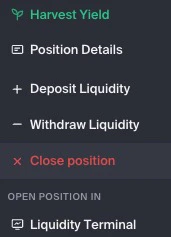
Review the details
A confirmation modal shows: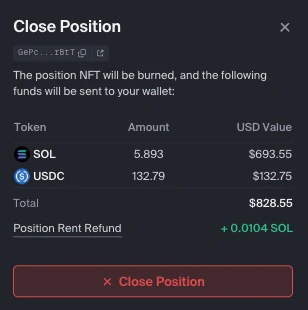
- Tokens you’ll receive
- Fees being harvested
- Whether the NFT will be burned
What Happens When You Close
Tokens Returned
All deposited tokens return to your wallet immediately
Fees Harvested
Any uncollected fees are automatically harvested
NFT Burned
The position NFT is burned by default (optional to keep)
Position Removed
The position no longer appears in your portfolio
Keep vs Burn the NFT
When closing, you can choose to keep the position NFT:Burn NFT (Default)
Choose if:
- You don’t plan to reopen this exact range
- You want a clean portfolio
- You’re done with this position
Keep NFT
Choose if:
- You might want to redeposit into the same range
- You want to preserve the position parameters
- You’re temporarily exiting
Alternative: Close via the Withdraw tab
You can also fully close a position from the Withdraw tab in the Position Details sidebar:- Open the position sidebar.
- Go to the Withdraw tab.
- Use the slider, click Max, or set the amount to 100%.
- Tick the Harvest and burn the NFT of this position checkbox to fully close the position. (Without this checked, you withdraw all liquidity but the position NFT stays in your wallet.)
- Click the action button at the bottom and approve in your wallet.
Next Steps
Open New Position
Start a new liquidity position
View Portfolio
Manage your remaining positions
Trading
Swap tokens on Orca
Range Orders
Use positions as limit orders