
Swap, deposit, done. All in one click. Autoswap trades your tokens at deposit time to match the required ratio and automatically deposits them into your position. Competitive quotes are sourced through supported aggregators within the Liquidity Terminal.Documentation Index
Fetch the complete documentation index at: https://docs.orca.so/llms.txt
Use this file to discover all available pages before exploring further.
How to use Autoswap
Select your aggregator
Swap using the default aggregator or choose your preferred aggregator for execution.Autoswap sources competitive quotes through supported aggregators.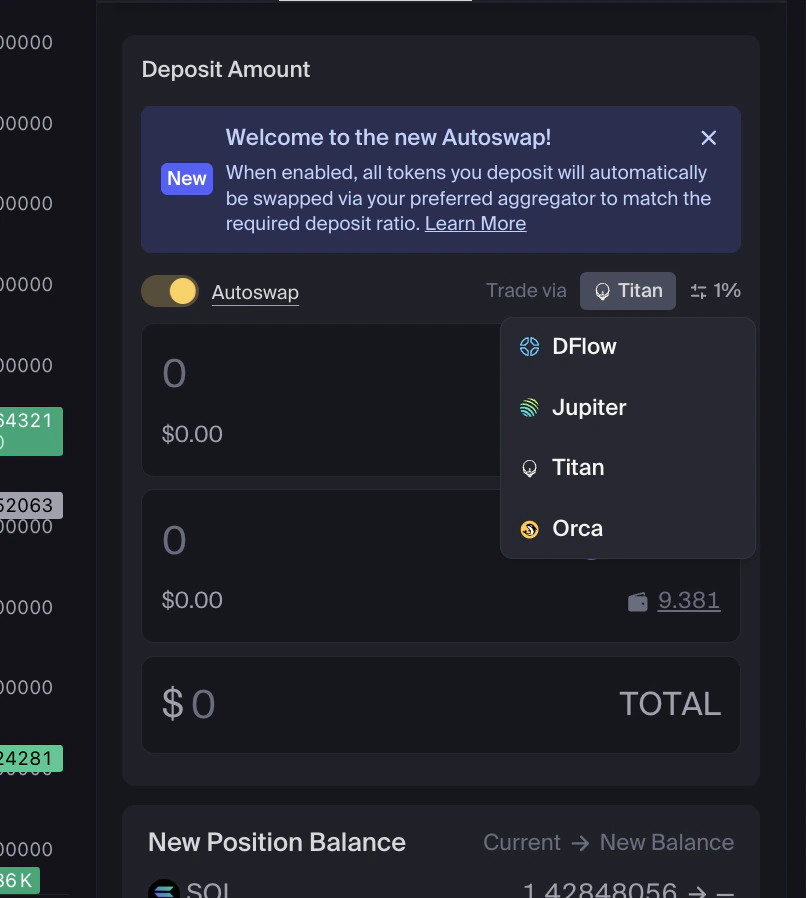
Enter deposit amount
Enter how much you want to deposit. You can:
- Enter an amount for one token
- Enter amounts for both tokens
- Enter a total combined deposit amount
What’s improved?
Autoswap introduces several improvements over the previous flow:Quotes from top aggregators
Compare prices across multiple aggregators to find competitive execution.
Aggregator transparency and choice
See which aggregator is used and select the one you prefer.
1-click deposits
The swap and deposit are bundled into a single transaction, reducing friction and failed deposits.
Custom defaults
Set a default aggregator in settings and change it at any time.
Fallback routing
If an aggregator is unavailable, Orca automatically routes through a backup option to complete your deposit.
Frequently Asked Questions
Do I need to use Autoswap?
Do I need to use Autoswap?
No. You can turn Autoswap off and deposit manually if you prefer full control.
Which aggregators are supported?
Which aggregators are supported?
Autoswap currently supports Titan, Dflow, and Jupiter. Users can also choose to trade via Orca Whirlpools.
Can I change my selected aggregator?
Can I change my selected aggregator?
Yes. You can change your selected aggregator at any time in settings.
Is Orca choosing the best quote for me?
Is Orca choosing the best quote for me?
Quotes from supported aggregators are surfaced transparently, and the best available option is highlighted based on price.
Why do I sometimes receive dust?
Why do I sometimes receive dust?
Small residual amounts can remain after a swap due to price movement or rounding. Any dust is returned directly to your wallet.
Is Autoswap safe?
Is Autoswap safe?
Yes. Swaps are executed through the aggregator you select, and funds never leave your control outside the transaction you approve.