
The Portfolio page is your command center for managing liquidity positions on Orca. View all positions, track performance, harvest fees, and make adjustments.Documentation Index
Fetch the complete documentation index at: https://docs.orca.so/llms.txt
Use this file to discover all available pages before exploring further.
Accessing Your Portfolio
Visit the Portfolio page
Go to orca.so/portfolio
What’s on the Portfolio Page
The Portfolio shows two top-level tabs:- Liquidity Positions — your concentrated liquidity positions across Whirlpools
- Vault Positions — your deposits into managed Vaults
| Metric | What it shows |
|---|---|
| Total Portfolio Value | Combined value of liquidity positions and vault positions |
| Total Liquidity Value | Combined value of LP positions only |
| Pending Yield | Unharvested fees and rewards across all positions |
| Estimated Yield (24H) | Projected next-24-hour earnings based on current activity |
- Positions — your active LP positions
- History — historical activity for your positions
- Closed Positions — positions you’ve fully closed
Position Row Columns
Each position row displays:| Column | Description |
|---|---|
| Pool | Token pair and fee tier (e.g. SOL / USDC · 0.04%) |
| Balance | Current USD value of the position |
| Total PnL | Profit/loss in USD with percentage delta |
| Pending Yield | Unharvested fees on this position |
| Est. Yield | Projected yield, with a selectable timeframe (7D by default) |
| Position Range | Min and max prices, with deltas from the current price |
| Current Price | Live price for the pair |
Position Action Menu
The ⋯ menu on each position row gives you six actions:| Action | What it does |
|---|---|
| Harvest Yield | Collects pending fees and rewards into your wallet |
| Position Details | Opens the full Position Details sidebar |
| + Deposit Liquidity | Jumps to the Deposit tab to add to the position |
| − Withdraw Liquidity | Jumps to the Withdraw tab to remove liquidity |
| × Close position | Fully closes the position and burns the NFT |
| Open Position In → Liquidity Terminal | Opens this position inside the Liquidity Terminal for chart-based management |
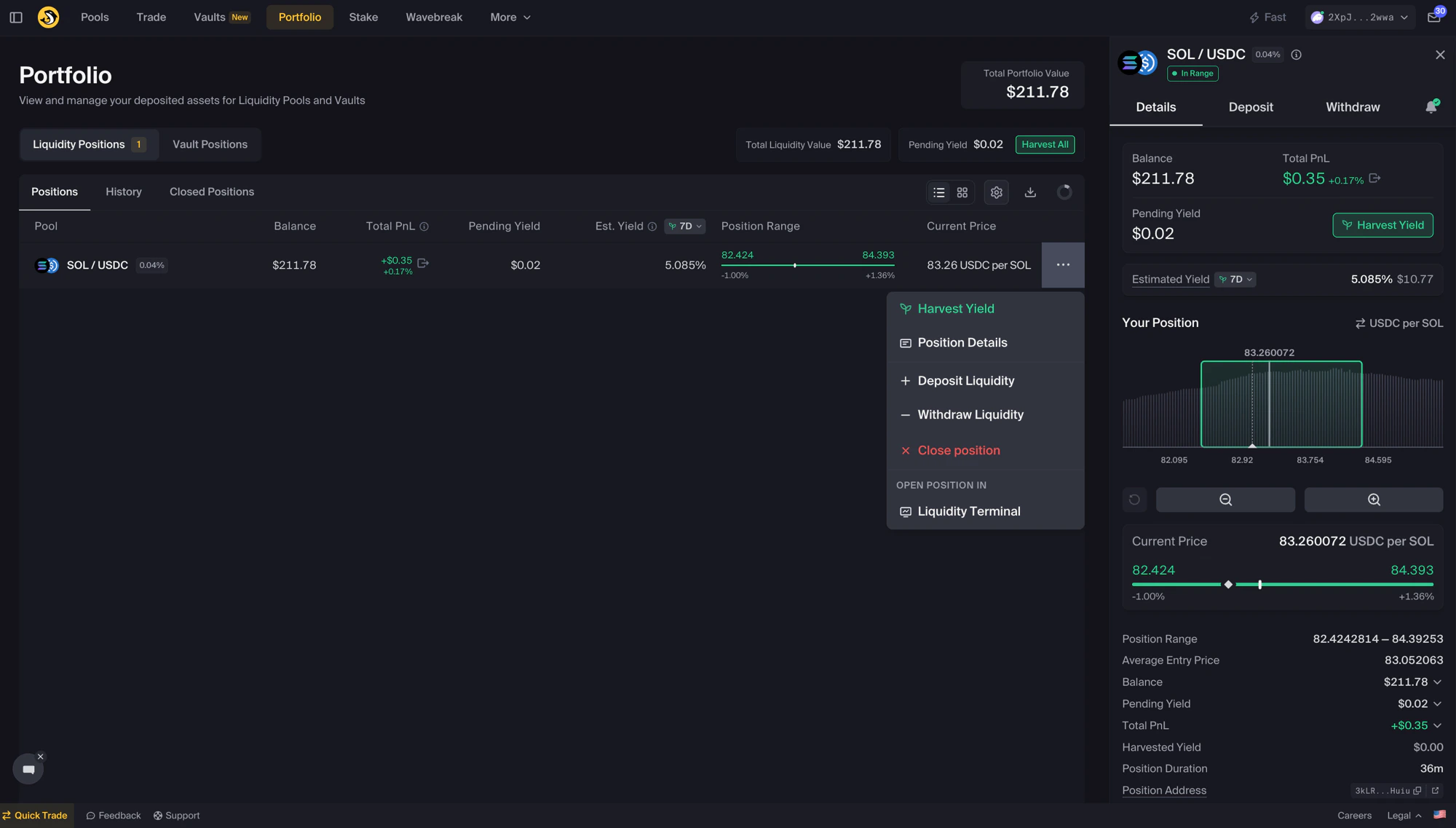
Position Details Sidebar
Details / Deposit / Withdraw tabs, plus a bell icon for alerts
Harvest Yield
Collect your accumulated fees
Add Liquidity
Increase an existing position
Withdraw Liquidity
Remove some or all of your liquidity
Understanding Position Status
In Range
You’re earning feesCurrent price is within your bounds. The position indicator shows green. Continue monitoring normally.
Out of Range
Not earning feesPrice moved outside your bounds. Consider rebalancing, waiting for price to return, or closing the position.
Understanding Position NFTs
Your liquidity positions are represented by NFTs. Each position = one unique NFT in your wallet that proves ownership.
Why This Matters
- Whoever holds the NFT controls the position
- Transferring the NFT transfers the entire position
- Burning the NFT means permanent loss of your position
Transferring Positions
To move a position to another wallet:- Transfer the position NFT to the new wallet
- The new wallet can now manage the position
- The original wallet loses access
- Moving to a hardware wallet
- Transferring to a multisig
- Selling positions (advanced)
Tracking Performance
What each metric means
The Portfolio page and Position Details sidebar surface these fields. Names below match the labels in the app.| Metric (as shown in app) | What it means |
|---|---|
| Balance | Current USD value of the tokens in your position |
| Total PnL | Change in position value, in USD and as a percentage delta |
| Pending Yield | Fees and rewards accrued on this position but not yet harvested |
| Estimated Yield | Projected yield over the selected timeframe (7D by default) based on current pool activity |
| Position Range | The min and max prices that define your range |
| Current Price | The live price for the pool’s pair |
| Average Entry Price | The reference price recorded for this position |
| Harvested Yield | Total fees and rewards already collected from this position |
| Position Duration | How long the position has been open |
| Position Address | The on-chain address of the position; click to open in a block explorer |
Calculating real returns
The Portfolio shows you what you’ve earned. It doesn’t show you what you’ve earned compared to just holding the tokens — and that’s the question that decides whether the position is worth keeping.- Positive real return → fees and rewards more than covered the IL
- Negative real return → IL ate your earnings; the range or fee tier may not match the asset’s volatility
Best Practices
Regular Monitoring
Regular Monitoring
| Position Type | Check Frequency |
|---|---|
| Full-range | Weekly or less |
| Wide custom range | Every few days |
| Tight custom range | Daily |
Harvest Timing
Harvest Timing
Consider harvesting:
- When fees reach a meaningful amount (relative to network fees)
- Before making any position changes
- For tax tracking purposes
- To compound earnings back into the position
When to Adjust
When to Adjust
Consider adjusting positions when:
- Out of range for extended periods
- Market conditions change significantly
- Better opportunities emerge
- You want to realize gains/losses
Troubleshooting
Position not showing
Position not showing
- Check wallet connection — Reconnect if needed
- Refresh the page — Wait for data to load
- Verify correct wallet — Ensure you’re using the right address
- Check NFT ownership — Position NFT must be in connected wallet
Incorrect values displayed
Incorrect values displayed
- Refresh the page — Prices update in real-time
- Check network status — Solana RPC issues can cause delays
- Clear browser cache — May show stale data
Can't interact with position
Can't interact with position
- Verify NFT ownership — Must be in connected wallet
- Check SOL balance — Need SOL for transaction fees
- Try again — Network congestion can cause failures
Security Tips
Protect NFTs
Never share or transfer position NFTs unless intentionally moving positions
Use Hardware Wallet
Consider hardware wallets for large positions
Verify Transactions
Always review transaction details before approving
Avoid Scams
Never click links from DMs or transfer NFTs to unknown addresses
Next Steps
Position Sidebar
Quick actions for position management
Harvest Yield
Collect your earned fees
Add Liquidity
Increase your positions
Position Alerts
Set up automated notifications